Strategic Insights Generator
Turn Visa intelligence into actionable marketing insight.
AI Transformations
Turn client requirements into stronger RFP responses, faster.
Note: Must be on a network in a Visa office or on VPN.
Notice:
This application is designed for use by Visa Client Marketing.
This first release will continue improving based on marketer feedback.
How it helps you
Turn client requirements and relevant Marketing Services content into a tailored response, with less time spent searching, sourcing, and drafting.
Create a tailored response from your client brief and context.
Find the right content faster.
Edit, strengthen, and finalize with confidence.
How to get started
AI Quick Start Guides are designed to help you get the most out of our proprietary Visa AI products from the start. Come back whenever you need a refresher and see below for helpful FAQs.
AI Quick Start Guide
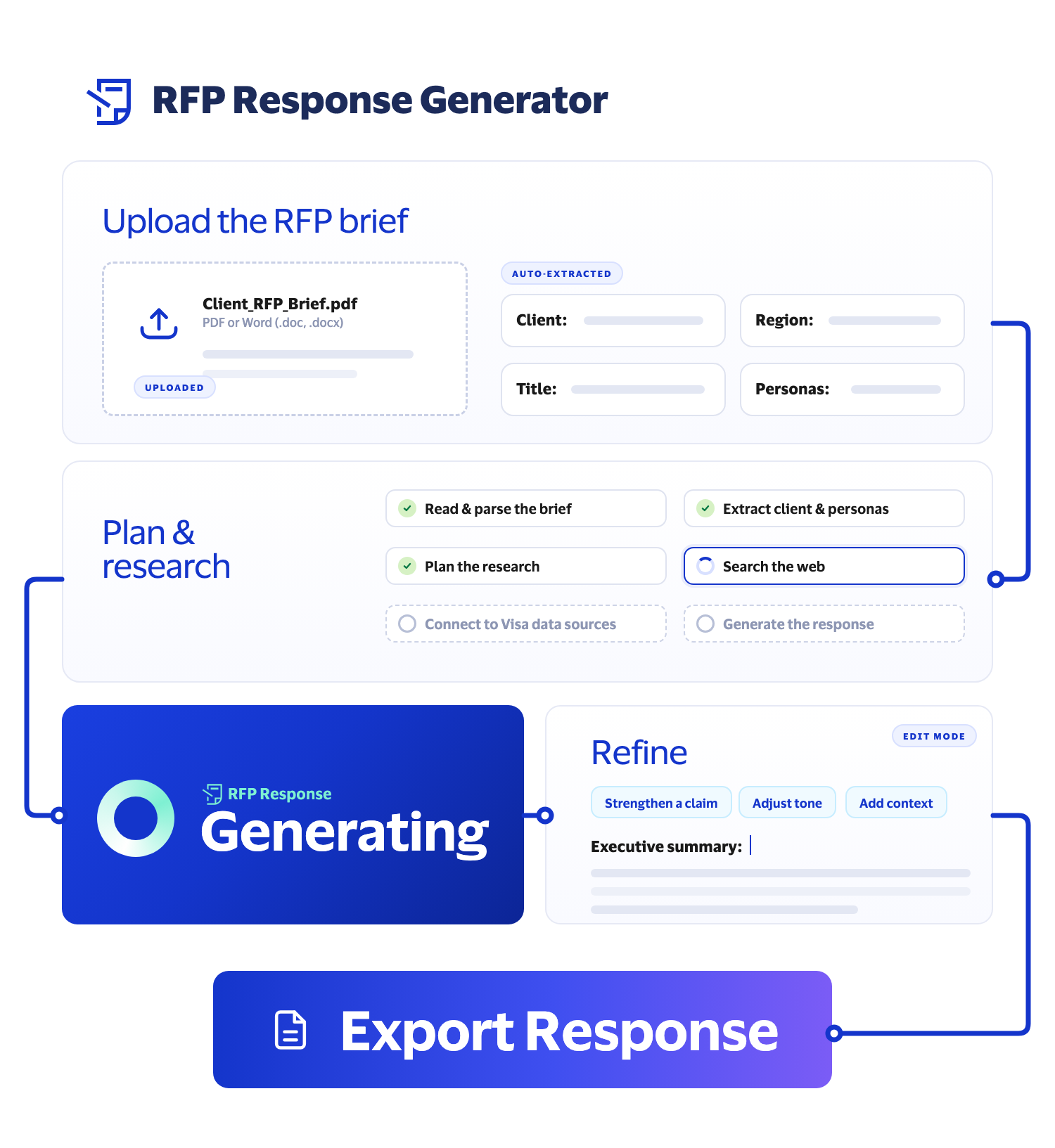
RFP Response Generator
Roadmap
Create stronger RFP response drafts today, with new ways to research, refine, and strengthen your response coming next.
PowerPoint Export Live
Export your RFP response to PowerPoint for client presentations.
Source Visibility Coming soon
See the source material behind your generated response.
Keep going
Turn Visa intelligence into actionable marketing insight.
Build tailored sales materials, fast.
Draft copy for digital channels.
Move from campaign idea to ready-to-review brief in minutes.
FAQs
RFP Response Generator is an AI-powered tool that turns a client's RFP brief into a complete, evidence-backed RFP response. Upload your brief, and the tool automatically extracts the client, region, title, and target personas from the document, then plans and runs the research needed to respond.
The agent reads the brief, builds a research plan, searches the web for relevant external context, connects to internal Visa data sources, and synthesizes everything into a draft RFP response. This reduces the manual effort of assembling a response from scratch.
The tool draws on internal Visa data sources alongside public web search, so responses combine Visa-specific intelligence with current external market context relevant to the client's brief.
Access the tool here.
Access is handled through Visa SSO using your Visa credentials, consistent with other Visa Marketing AI tools.
Upload the client's RFP brief using the upload option on the home page. The tool automatically extracts:
Once extraction is complete, the agent plans its research, searches the web and internal Visa sources, and generates a full RFP response. You should always review the generated response and make edits as needed before you export (see Results and export).
The agent runs through a structured workflow:
Assistant Steps show how the agent is working through the brief (extraction, research planning, source gathering, and response generation) so you have visibility into how the response was built rather than just the final output.
Because the agent reads the full brief, plans targeted research, searches both external and internal sources, response generation involves multiple steps rather than a single lookup. Progress indicators show you where the agent is in the process. Typical generation time is 2–3 minutes.
Yes. The auto-extracted client, region, title, and target personas can be reviewed and edited before the agent generates the response. Ensure you review all details in case any were mis-extracted or need adjusting.
RFP Response Generator is designed to help teams respond to client RFPs faster and more consistently by grounding each response in both current market research and Visa's own approved positioning.
Common use cases:
Upload the client's actual RFP brief document. The tool is designed to work directly from the brief as provided by the client, extracting the context it needs rather than requiring you to re-input client, region, or persona details manually.
Yes. No PII or sensitive data should be uploaded to the tool. Before uploading, make sure the material is appropriate, relevant to the business need, and compliant with Visa's data handling and content requirements policies.
Do upload:
Do not upload:
Supported file types for the RFP brief upload:
If an upload fails, verify:
Each response draws on multiple categories of evidence: external web search results relevant to the brief, and internal Visa data sources. The agent plans its research based on what the brief requires, rather than treating all sources as equally weighted for every question.
Where sources are provided, use them to review and validate the information included in your response. Source visibility is continuing to evolve, so always review generated content against the original RFP and relevant source materials before using it in a final response.
Review the generated response for relevance, accuracy, and completeness before sending it to a client. Verify any client- or region-specific details and check that external research cited is still accurate. You are responsible for reviewing the output before it is used externally.
Once the response is generated, review it in the tool. Export the final response as a PowerPoint or Word document.
Always review AI outputs before use. Confirm the response addresses the client's RFP requirements, validate key claims and brand language, and apply your own judgment before sharing externally.
Yes. The tool offers refinement prompts so you can refine specific parts of the generated response, such as strengthening a claim, adjusting tone, or adding more context, without re-uploading the brief or starting over.
Use the Refresh button or manually refresh the page in your browser.
Confirm the uploaded brief was parsed correctly (check the extracted client, region, title, and personas), then retry. If issues persist, contact the Visa Marketing AI Tools GDL team at GDLSupportRFPResponseGenerator@visa.com.
Contact the Visa Marketing AI Tools GDL team at GDLSupportRFPResponseGenerator@visa.com.